

Improving find-ability & intuitiveness - Basic Fit App
Can our members easily find the most important information, journeys within our app?
Industry
B2C, Fitness
Users
4.2 million
Company size
8000+
Role
Ui/Ux Design
Timeline
Jul 2024- Sept 2024
The Problem & The Opportunity
How intuitive is our app to use?
Our recent tree test highlighted that some information is hard to find within our app making it feel less intuitive
We have also recently taken the decision to remove a section/service of the app (online coach) in the near future
These are the design improvements to make our app more intuitive to use while sunsetting the feature
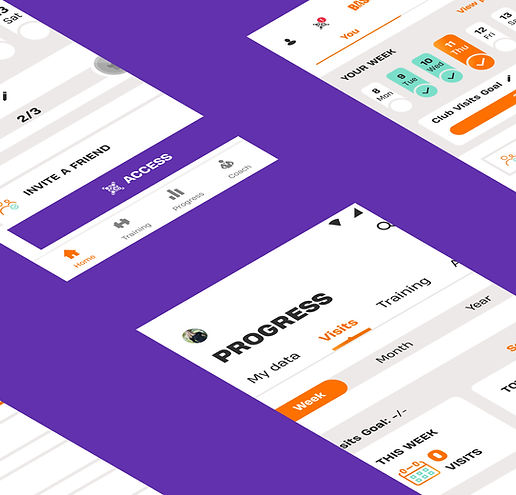
The Impact
We validated the new information architecture through follow-up testing and early behavioral analytics:
Task success increased from 63% → 79%.
First-click accuracy improved by +23pp.
Time to reach key features decreased by 26%.
Misnavigation dropped from 37% → 21%.
Feature engagement increased by 19–27% across key journeys.
These results reflect measurable improvements in findability, navigation efficiency, and feature adoption. Most importantly, users reported that the app “finally makes sense” and that they “don’t have to think about where to tap.”
The UX research
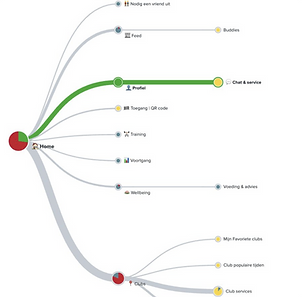
We teamed up with a UX researcher and set a Tree Test, to evaluate the information architecture of our app.
With the help of our external partners a tree test was conducted using Optimal Workshop in July 2024 to evaluate how easily users could find information within the Basic Fit app, with the goal of improving its structure and terminology (information architecture).
Here’s what was done:
-
Tested 2 menu structures: Variant 1 introduced "wellbeing" as a menu item, while Variant 2 introduced "plans."
-
202 participants: Split evenly, with 101 testing variant 1 and 101 testing variant 2.
-
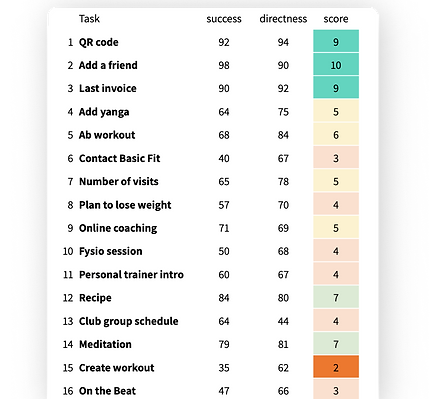
8 tasks per participant: Each participant completed a random set of 8 tasks (from a total of 16), ensuring that each task was performed by around 50 people.
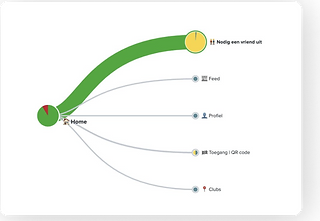
This study helped us identify how users navigate the app, providing insights to refine its menu and labeling. The study took place on July 2024
Key Finding & Next Steps
Some things are hard to find for users; e.g. contacting us, or find our video workouts,

.png)
We need to improve Findability in the App...
..In our Professional Services
We saw that users are likely to associate “wellbeing” with finding a physio. For this reason we placed an entry point for physio in wellbeing

Furthermore users are likely to browse in training to find our Personal Training intro service and that is why added am entry point for PT intro in Training

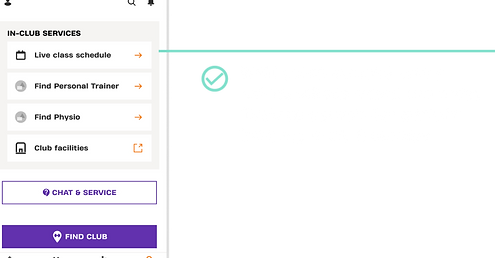
...When contacting us
The majority of users mistakenly go to clubs when asked to contact us
Before
.jpeg)
After
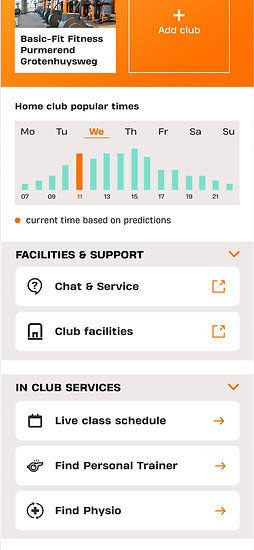
Title the in-club options to make it clear
Place the chat & service button in clubs also
Rename it from “services” to “club facilities”
We also added a secondary entry point ofr PT intro and physio to Clubs screen since we noticed a part of our testers looked for these services there as well.
...In our group classes
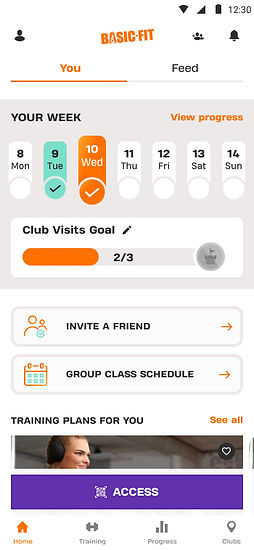
Users somewhat struggle to find the group classes schedule. They check in “Training”

.jpg)
Leveraging our home screen
For a small % of users, group classes are very relevant. We plan to place a quick access button the group class schedule to users who told us, during their onboarding, they are interested. We can only do this when the user has a home club with group classes.
...When looking for video workouts
Our namings have confused our users, “Plans” and “On the beat” are not descriptive enough for our then
Before

After
.jpeg)
We will keep the word “training” before “plans”
We added a carrousel for “video workouts”
Ui Crowdness
Our training content / training features interface is perceived to be “busy” and adds to the feeling of difficulty in finding things
Before
.jpeg)
After
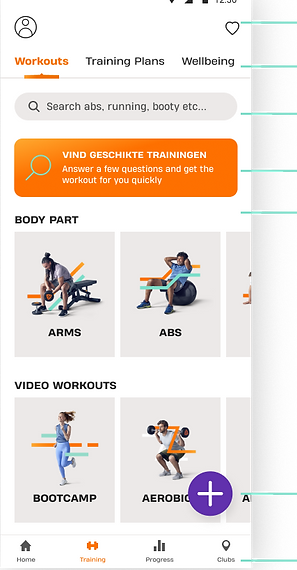
1. Move favourites to header and remove buddies/inbox when on the training screen
2. Reduce space between tabs so all appear in full view
3. Full width search with help text so users find it more easily
4. Workout finder visually tidier
5. We will remove the personalise content banner entirely
6. Floating Menu button to access workout options: workout builder & interval timer, while keeping the screen tidier
7. Our new 4 item menu should focus our users on Training, Progress and club options